
Microsoft 365 Services
Microsoft 365 Done the Way Microsoft Actually Recommends
Most Microsoft 365 tenants are stood up in an afternoon and then never touched again. That is where the security gaps, the license waste, and the surprise data-loss stories come from. Inoconn migrates, hardens, and administers Microsoft 365 for Las Vegas businesses — Exchange Online, Teams, SharePoint, OneDrive, and Entra ID — under a documented governance model.
Detailed Service Overview
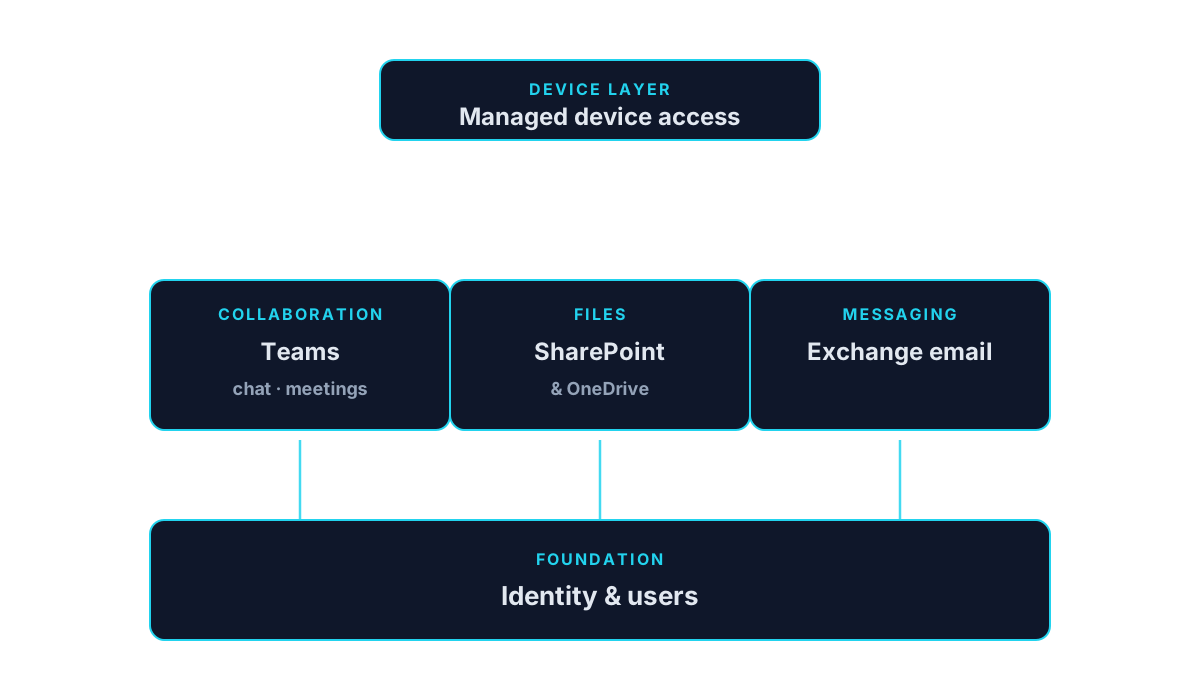
Microsoft 365 is not a single product. It is a suite that stitches together identity (Entra ID), email (Exchange Online), collaboration (Teams and SharePoint), file sync (OneDrive), device management (Intune), and security (Defender and Purview) into what should be one consistent experience for your users. When it is deployed well, employees onboard in an hour and never think about it. When it is not, small businesses spend years fighting mailbox delegation, orphaned SharePoint sites, ex-employees with lingering access, and shadow tenants nobody remembers creating.
Inoconn administers Microsoft 365 tenants for organizations across Las Vegas, Henderson, Summerlin, and greater Southern Nevada — from five-seat professional practices on Business Basic to 250-seat firms on Business Premium and E3/E5 mixes. Our engagement is not a one-time deployment; it is ongoing tenant administration under a defined governance model, with a documented owner for identity, licensing, mailflow, collaboration, security, and backup.
This service is built for organizations in four common situations: standing up Microsoft 365 for the first time; migrating from Google Workspace, IMAP, or an on-premises Exchange server; inheriting a tenant that was set up by a former IT person and never documented; or consolidating tenants after an acquisition. Each has a different starting point and a different risk profile, and each gets its own written migration or take-over plan.
The problems Microsoft 365 clients typically bring us are concrete: mailflow that breaks silently, MFA that was turned on for admins but not users, licenses assigned three org charts ago, SharePoint permissions inherited from a legacy migration, external sharing set to 'Anyone with the link,' and a quiet assumption that Microsoft backs up their data. (Microsoft explicitly does not — see the Microsoft 365 backup section below.)
Under the hood we manage tenants with Entra ID as the identity anchor, Conditional Access as the control plane, Intune where clients license it, and Defender for Business or Defender for Office 365 depending on plan. Third-party backup (Datto SaaS Protection, Veeam Backup for Microsoft 365, or Barracuda) is deployed for every managed tenant — not as an upsell, but as a base requirement.
Onboarding to managed Microsoft 365 is a defined 15-to-30-day project: tenant audit, secure-score baseline, MFA and Conditional Access rollout, license right-sizing, external sharing hardening, backup deployment, and handoff to steady-state administration. From that point forward we own tenant health, monthly reporting, quarterly review, and coordinated user onboarding and offboarding as part of standard IT operations.
Inoconn Commitment
Every service we deliver is backed by our satisfaction guarantee and decades of combined IT expertise.
How it looks
Email, files, and meetings on one foundation
Identity, licensing, and device access are configured so day-to-day collaboration works the same way for everyone.

Critical Insight
Why Tenant Governance Is the Real Microsoft 365 Story
Why This Service Matters
Microsoft 365 sells on productivity but wins or loses on governance. The features are excellent; the defaults are permissive. External sharing is on. Guest access is on. Basic authentication has finally been retired, but there are still tenants with legacy protocols enabled from years ago. Users can create Teams and SharePoint sites with no lifecycle. Any tenant left alone for eighteen months turns into a slow-motion data-sprawl problem.
The security case is now table stakes. Business email compromise remains the single most common insured incident for SMB, and it almost always begins with a Microsoft 365 account taken over via credential stuffing or MFA-fatigue. Conditional Access, phishing-resistant MFA, and inbox-rule monitoring are the specific controls that cut this risk down — and every cyber-insurance renewal application now asks about them by name.
Finally, Microsoft 365 spend is quietly one of the top three IT line items for most SMBs, and it drifts. Users get licenses on day one that they still hold years after leaving. Nobody moves people from E3 to Business Standard when eligibility changes. Add-ons get purchased once and forgotten. A quarterly license review — plus proper deprovisioning at offboarding — routinely returns 10-25% of a tenant's annual license cost.
Where it lives
Real desks, real everyday work
Email, files, and meetings are how the working day happens — a tenant that is quietly well-configured shows up as smoother handoffs, not as a product logo on a screen.

Where This Fits
Microsoft 365 Environments We Support
Microsoft 365 planning and administration scale from small tenants standing up email for the first time to multi-license organizations tightening security and governance.
Professional offices
Organizations standardizing on Microsoft 365 for mail, files, and Teams.
Multi-location businesses
Companies consolidating tenants, licensing, and shared drives across sites.
Nonprofits
Organizations evaluating nonprofit-eligible Microsoft 365 licensing.
Hybrid workforces
Teams that rely on Teams, SharePoint, and OneDrive for daily collaboration.
Internal IT departments
Existing IT staff needing project support for migrations or tenant hardening.
Problems → Solutions
Challenges We Eliminate
MFA Isn't Actually On for Everyone
Security defaults were disabled during a fix years ago; MFA is enforced for admins but not for users, or is enrollment-based and half the org hasn't enrolled.
Migration Done With a Written Cutover Plan
Exchange, Google Workspace, IMAP, and on-prem Exchange migrations with a documented plan: pilot, coexistence, cutover weekend, and hyper-care. Users move on a schedule they know about a week in advance.
Ex-Employees Still Have Access
Offboarding stops at 'we changed their password.' Mailboxes stay active, OAuth grants remain, shared devices stay signed in, and forwarding rules quietly persist.
Entra ID as the Identity Anchor
Hybrid Entra Connect where an on-prem AD still exists, cloud-only where it doesn't. Groups, licensing, and Conditional Access driven from Entra — not from tribal knowledge.
External Sharing Is Wide Open
SharePoint and OneDrive are set to 'Anyone with the link.' Nobody knows which links exist or where they were sent.
Conditional Access & Phishing-Resistant MFA
Baseline Conditional Access policies (require MFA, block legacy auth, session controls for unmanaged devices) with phishing-resistant methods (Authenticator number-matching, FIDO2 keys) for privileged roles.
Nobody Is Backing Up Microsoft 365
The assumption is that Microsoft handles it. Microsoft's own documentation is explicit that customers are responsible for their data — retention policies are not backup.
License Right-Sizing
Quarterly license review comparing assigned SKUs against actual usage. Downgrades, cancellations, and add-on rationalization documented against measured savings.
Licenses Are Wrong or Wasted
Users on E3 who need Business Standard; Business Basic seats assigned to leadership who need mailboxes on their phones; add-ons that duplicate features already included.
Email Security Hardening
SPF, DKIM, and DMARC deployed and moved from p=none to quarantine/reject. Anti-phish, safe links, safe attachments, and impersonation protection tuned per role.
Teams and SharePoint Sprawl
Every project spawned a Team, every Team spawned a SharePoint site, and no one owns lifecycle. Search is polluted, permissions are unclear, and retention is a guess.
Third-Party Backup
Datto SaaS Protection, Veeam Backup for Microsoft 365, or Barracuda Cloud-to-Cloud Backup for Exchange, OneDrive, SharePoint, and Teams. Restore drills quarterly.
Mailflow Fails Silently
SPF, DKIM, and DMARC misconfigured; DMARC still on p=none years after setup; a scoped connector routes half the mail through an appliance nobody remembers deploying.
Governance for Teams & SharePoint
Naming, provisioning, and expiration policies for Teams and Microsoft 365 Groups. Sensitivity labels for confidential sites. Guest access review on a schedule.
Engagement Model
How a Microsoft 365 Engagement Runs
Microsoft 365 work is scoped to the tenant, licenses, and outcomes agreed with the customer before configuration changes begin.
Tenant review
Inventory of licensing, users, groups, sharing, and administrative role assignments in the tenant.
Planning
Written plan for the specific outcome — migration, hardening, cleanup, or a new workload rollout.
Implementation
Configuration changes performed in a defined sequence with clear change communication.
User onboarding
Guidance materials or short sessions where user experience is meaningfully changing.
Documentation
Configuration and license reference delivered at close for the customer's records.
How it's configured
Identity, access, and licensing set up once and left tidy
New hires arrive with the right access on day one, departures are actually closed out, and shared drives don't grow into an unmanageable pile of duplicated folders.

Microsoft 365 Coverage
Microsoft 365 Workloads We Support
Microsoft 365 work is scoped to supported subscription plans, license classes, and administrative access agreed with the customer.
Exchange Online
Mail flow, mailbox lifecycle, shared mailboxes, and administrative controls.
Microsoft Teams
Team, channel, meeting, and policy configuration on supported plans.
SharePoint Online
Site structure, permissions, and content organization for team and department use.
OneDrive for Business
User file storage, sharing controls, and known-folder configuration.
Microsoft Entra ID
Identity structure, group management, and MFA / conditional access on supported plans.
Licensing review
Comparison of assigned licenses against actual usage and identity needs.
Room to work
Meeting spaces that just work
Room audio, video, and calendar integration are set up so joining a call is the same short experience whether the team is in the office, at home, or split between the two.

What's Included
Exchange Online Administration
Mailflow, connectors, transport rules, shared mailboxes, dynamic distribution groups, retention policies, and litigation hold where required.
Teams Voice & Collaboration
Teams governance, meeting policies, external federation, live event support, and Teams Phone / Direct Routing when we're also standing up VoIP.
SharePoint & OneDrive Governance
Site provisioning standards, permissions cleanup, external sharing scoping, retention labels, and search optimization.
Entra ID (Azure AD)
Hybrid identity, group-based licensing, Conditional Access, self-service password reset, and password protection. Break-glass accounts documented.
Conditional Access & MFA
Baseline policies (require MFA, block legacy auth, require compliant device for admins) plus role-specific policies. Phishing-resistant MFA for admins.
License Optimization
SKU comparison, unused license reclamation, right-sizing (Business Basic ↔ Standard ↔ Premium ↔ E3/E5), and add-on rationalization.
Microsoft Defender for Office 365
Safe Links, Safe Attachments, anti-phish, impersonation protection, and Attack Simulator (where licensed) with tuned policies per role.
Third-Party M365 Backup
Full Exchange, OneDrive, SharePoint, and Teams backup with independent retention and point-in-time restore.
Governance & Retention
Sensitivity labels, retention policies, and DLP rules configured against actual data classifications — not a generic template.
Tenant Documentation
Full tenant configuration documented in IT Glue / Hudu: admin roles, Conditional Access policies, licensing model, backup config, mailflow diagram, and runbooks.
Outcomes That Matter
Benefits & Results
Users Get Time Back
Consistent identity, working single sign-on, and predictable Teams/SharePoint make routine work faster.
Key Advantage
Fewer Account Compromises
Conditional Access and phishing-resistant MFA block the specific attacks that drive most SMB email compromise.
License Spend Under Control
Quarterly reconciliation typically returns 10-25% of tenant license cost in the first year.
Restorable Data
Third-party backup means a deleted SharePoint library, ransomed OneDrive, or compromised mailbox is restorable to a point in time.
Clean Offboarding
One-ticket offboarding that closes every door — access, tokens, forwarding rules, mobile sessions — in minutes.
Audit-Ready Evidence
Configuration, access review logs, MFA enforcement reports, and DLP hits are the exact artifacts insurance underwriters and HIPAA/PCI/SOC 2 auditors request.
A Named Owner for the Tenant
A specific engineer at Inoconn owns your tenant. No more emails to 'IT@' hoping someone answers.
How it feels
Hybrid meetings that don't punish the remote seat
Everyone in the meeting — in the room and on the call — sees, hears, and contributes on comparable footing, which is the productivity win people actually notice.

Risks Addressed and Operational Outcomes
What Microsoft 365 Work Is Designed To Change
Microsoft 365 engagements are designed to give the tenant a supportable structure and to give leadership a clear view of what is licensed and used.
Risks addressed
- Licenses assigned years ago that no longer match usage
- Sharing structures that quietly grow into access-review problems
- Administrative accounts without appropriate controls
- Mail flow and impersonation exposure that has never been reviewed
Operational outcomes
- A license model reviewed against actual usage
- A documented sharing and structure model
- Administrative access aligned to role
- A baseline of tenant hardening documented for the customer
How the tenant fits together
Representative Situations
Situations Microsoft 365 Work Commonly Addresses
These are representative situations, not case studies.
Representative situation
A business owner may be paying for Microsoft 365 licenses that were assigned years ago and no longer match how the organization actually works.
A license review and cleanup plan become the near-term deliverable.
Representative situation
An operations director may need SharePoint and OneDrive structured so that departments can share files without accidentally granting broad access.
A written structure with owner, review, and access model becomes the focus.
Representative situation
An internal IT lead may need supplemental capacity to complete a mail or file migration on a specific timeline.
A scoped, phased implementation with documented handoff becomes the near-term outcome.
Who This Service Is For
Whether you're a homeowner, small business, or enterprise — we tailor our approach to your specific needs.
Businesses Migrating From Google Workspace or IMAP
Organizations moving to Microsoft 365 who want a supported migration, not a weekend of DIY.
Organizations With an Unmanaged Tenant
Businesses whose tenant was stood up by a founder, contractor, or former staffer and never governed.
Firms in Regulated Industries
Healthcare, legal, financial, and government-contracting organizations that need documented controls and evidence.
Growing Companies Adding Users Monthly
Businesses adding staff faster than a manual process can keep up with — onboarding automation is the difference.
Post-Acquisition Tenant Consolidations
Companies merging two Microsoft 365 tenants after an acquisition, or migrating an acquired company into the parent tenant.
Any Business Without Third-Party M365 Backup
If you have Microsoft 365 and no independent backup, you have a data-loss exposure the tenant itself does not solve.
Planning ahead
License and rollout decisions, without surprises
Licensing, rollout order, and change management are talked through in advance — so a new feature isn't a surprise dropped on end users the morning it turns on.

Is This the Right Fit
When Microsoft 365 Work Is the Right Starting Point
Microsoft 365 engagements are usually scoped to a specific outcome — migration, cleanup, hardening, or a new workload rollout.
This is a good fit when
You need a specific Microsoft 365 outcome
Migration, license review, security hardening, or SharePoint / OneDrive structure needs a scoped project.
A different service may fit better
Consider Cloud Solutions
If the effort spans beyond Microsoft 365 into broader cloud strategy or workload migration.
Cloud SolutionsConsider Managed IT
If Microsoft 365 should be owned inside a broader operating model rather than as a project.
Managed IT
Technology & Tools
We leverage industry-leading platforms and enterprise-grade equipment to deliver reliable, future-proof solutions.
Mailboxes, mailflow, connectors, transport rules, hybrid configurations, and legacy tenant cleanup.
Chat, meetings, calling, and channels. Governance policies, external federation, and Teams Phone integration.
Site design, provisioning standards, permissions, external sharing scoping, and information architecture.
Known Folder Move, sync scoping, retention, and restore workflows.
Identity, groups, group-based licensing, Conditional Access, PIM (where E5), and self-service password reset.
Safe Links, Safe Attachments, anti-phish and impersonation policies, and threat explorer.
MDM/MAM for corporate and BYOD devices where the client licenses it, integrated with Conditional Access for compliant-device policies.
Independent third-party backup for Exchange, OneDrive, SharePoint, and Teams.
Retention labels, DLP, and (where licensed) sensitivity labeling and Insider Risk.
Service Tiers & Options
Microsoft 365 Migration Project
Fixed-fee migration from Google Workspace, IMAP, or on-prem Exchange to Microsoft 365, with cutover plan, pilot, and hyper-care.
Tenant Assessment & Hardening
Point-in-time audit and hardening engagement: secure score baseline, MFA and Conditional Access rollout, license right-sizing, and governance policies.
Managed Microsoft 365 (Subscription)
Ongoing tenant administration under SLA: monthly patching and reporting, quarterly license and access reviews, and user onboarding/offboarding automation.
Co-Managed Microsoft 365
For organizations with internal IT, we own tenant hardening, identity, and backup while the internal team handles day-to-day user requests.
Frequently Asked Questions
Get answers to the most common questions about this service. Can't find what you're looking for? Contact us directly.
Getting Started
Preparing for an Engagement
Practical guidance for leadership evaluating whether this service is the right next step.
Preparing for an assessment
- The tenant admin contact and current licensing view
- The specific outcome — migration, cleanup, hardening, or new workload
- Any user-visible change constraints (event windows, seasonal load)
Information to gather
- Current license assignments compared to actual usage
- Current identity source (Entra ID only or hybrid with Active Directory)
- Current sharing, guest access, and administrative role assignments
- Any third-party integrations to the tenant
Working with existing vendors
- We coordinate with existing Microsoft partner-of-record relationships where they remain in place
- We work with third-party integrators for line-of-business apps that touch the tenant
Ready for Microsoft 365 Services?
Don't let technology problems slow you down. Contact Inoconn today to discuss your goals and see how our team can deliver the results you need — reliable, expert IT support you can build a business on.
No obligation. Honest, expert IT support.
Buyer Journey
Where This Fits in a Broader IT Program
Business technology decisions rarely stand alone. These are the services most commonly discussed alongside this one and why they show up together.