The network is invisible until it isn't
When a network works, nobody notices. When it doesn't, everything slows down: files that won't open, video calls that freeze, printers that vanish, credit card readers that time out. These are almost never random. They are symptoms of a network that has outgrown its design.
1. Wi-Fi drops in the same spots every day
If you can predict which corner of the office will lose Wi-Fi, the problem isn't the devices — it's coverage. Consumer access points, or a single business AP mounted in one closet, cannot cover a whole floor evenly. A proper design uses a small number of overlapping enterprise APs placed based on a walk-through of the space, tuned for the number of devices and the materials in the walls.
2. Video calls are unreliable at busy times
When calls freeze between 10am and 2pm but work fine at 6pm, the network is being saturated during business hours. That could be undersized internet, missing quality-of-service rules, or a switch that's simply too old to handle current traffic. Adding a second internet circuit or enabling QoS for voice and video is usually a bigger step forward than "buying more bandwidth."
3. Guests, staff, and devices all share one network
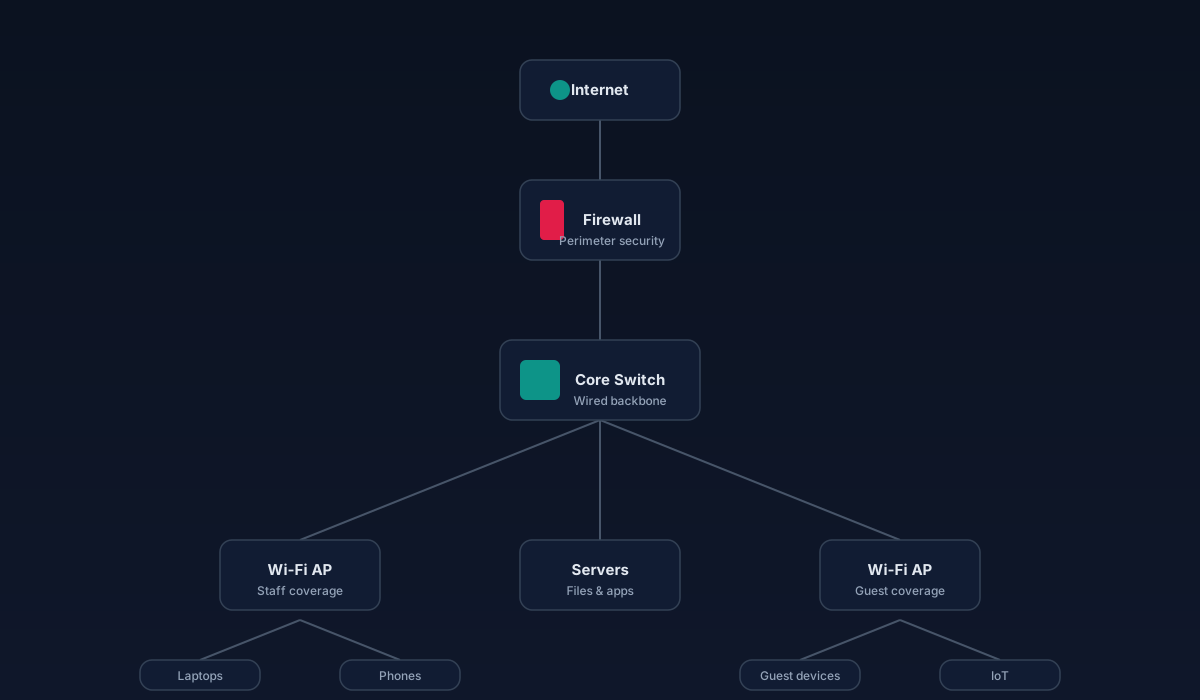
When everything is on one flat network, a compromised guest laptop or an infected phone can reach your file server. Segmentation — separating staff, guests, payment devices, cameras, and IoT — contains problems and improves performance. Modern business firewalls and switches make this straightforward.
4. Nobody knows what's plugged into what
An unlabeled patch panel, mystery cables running above the ceiling, and no documentation are all signs a network has been added to for years without ever being organized. When something breaks, troubleshooting takes hours instead of minutes. Structured cabling done right — labeled at both ends, tested, and documented — pays for itself the first time you need to trace a fault.
5. Growth is coming and the network can't absorb it
Adding staff, opening a second location, deploying VoIP, moving to cloud apps, adding security cameras — each of these puts more pressure on the network. If the current setup is already struggling, adding load will not go well. Upgrading before the growth is much less disruptive than upgrading during it.
What a real upgrade looks like
A proper network refresh isn't just replacing boxes. It typically includes:
What the difference feels like
After a good upgrade, calls stay connected. Files open quickly. Devices roam between APs without dropping. Guests can't see internal systems. When something does go wrong, the labeled patch panel and central dashboard make it a ten-minute fix instead of a half-day search.
When to plan for it
Most business networks are due for meaningful attention every five to seven years. Sooner if the environment has changed — new tenants overhead, a remodel, a growth spurt, a move to VoIP or cloud apps. If you're seeing two or more of the signs above, it's worth a conversation now rather than after the next outage.
Bottom line
A business network is infrastructure. Treat it the way you treat plumbing or electrical: install it correctly once, document it, and maintain it. The return shows up in the calls that don't drop, the meetings that don't stall, and the hours your team stops losing to workarounds.